
Translate Image
Full control over the visual quality and terminological consistency of your images.
Lara Image Translation is an advanced solution designed to translate textual content within images, combining linguistic precision with visual fidelity. Thanks to its flexible architecture, the service offers a choice of four different image translation modes, allowing it to adapt to the specific needs of each project, from simple text extraction to complete image regeneration.
Lara offers four incremental levels of accuracy and visual quality:
- Overlay: Overlays the translated text on the original image, preserving the basic visual context.
- Inpainting: Removes the original text and inserts the translation “in-place,” reconstructing the background for a natural and clean result.
- Generative: The most advanced mode, which regenerates the entire image, including the translated content, for the highest visual quality.
- Image to Text: Extracts text from an image and returns both the transcription and its translation into the target language. It detects the text in the image, preserves the original content, and provides the translated version in a single response.
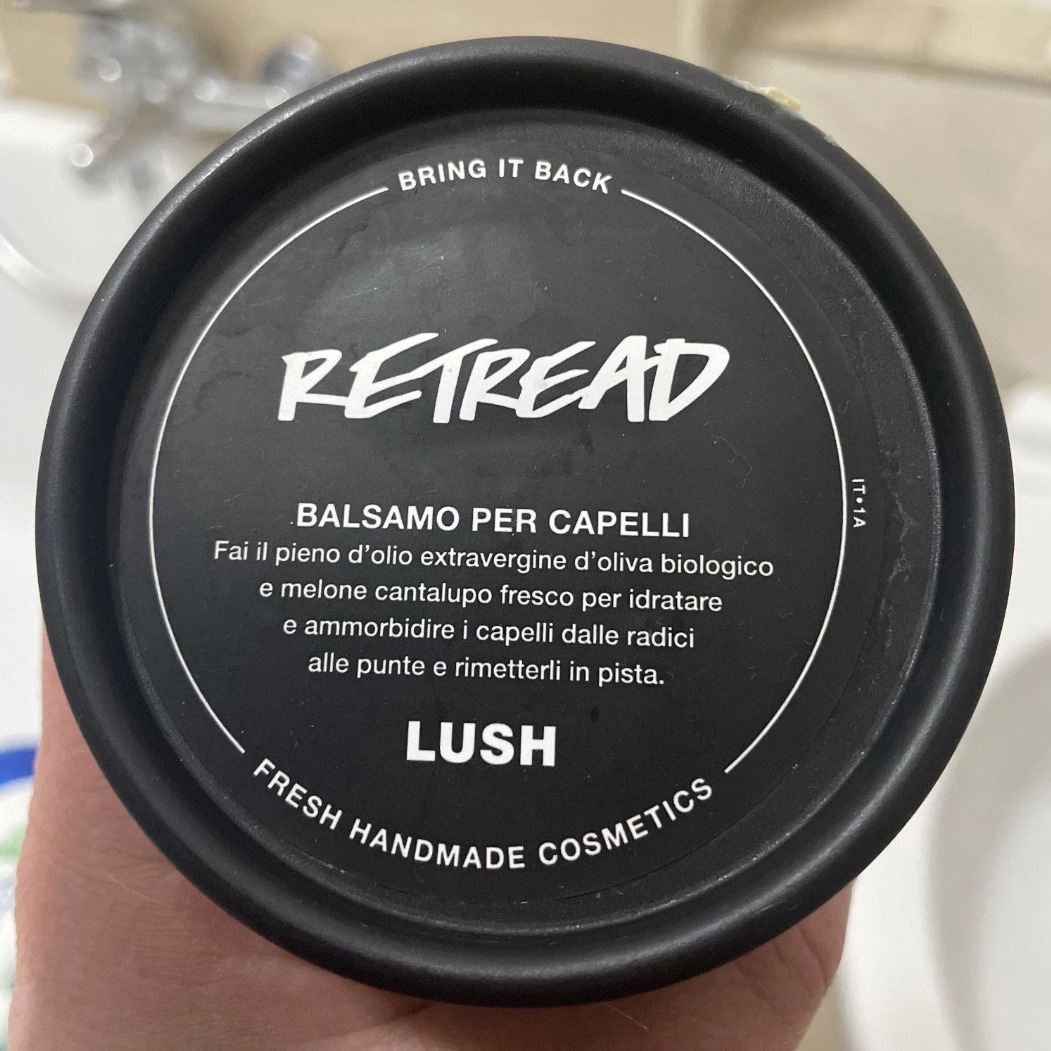 | 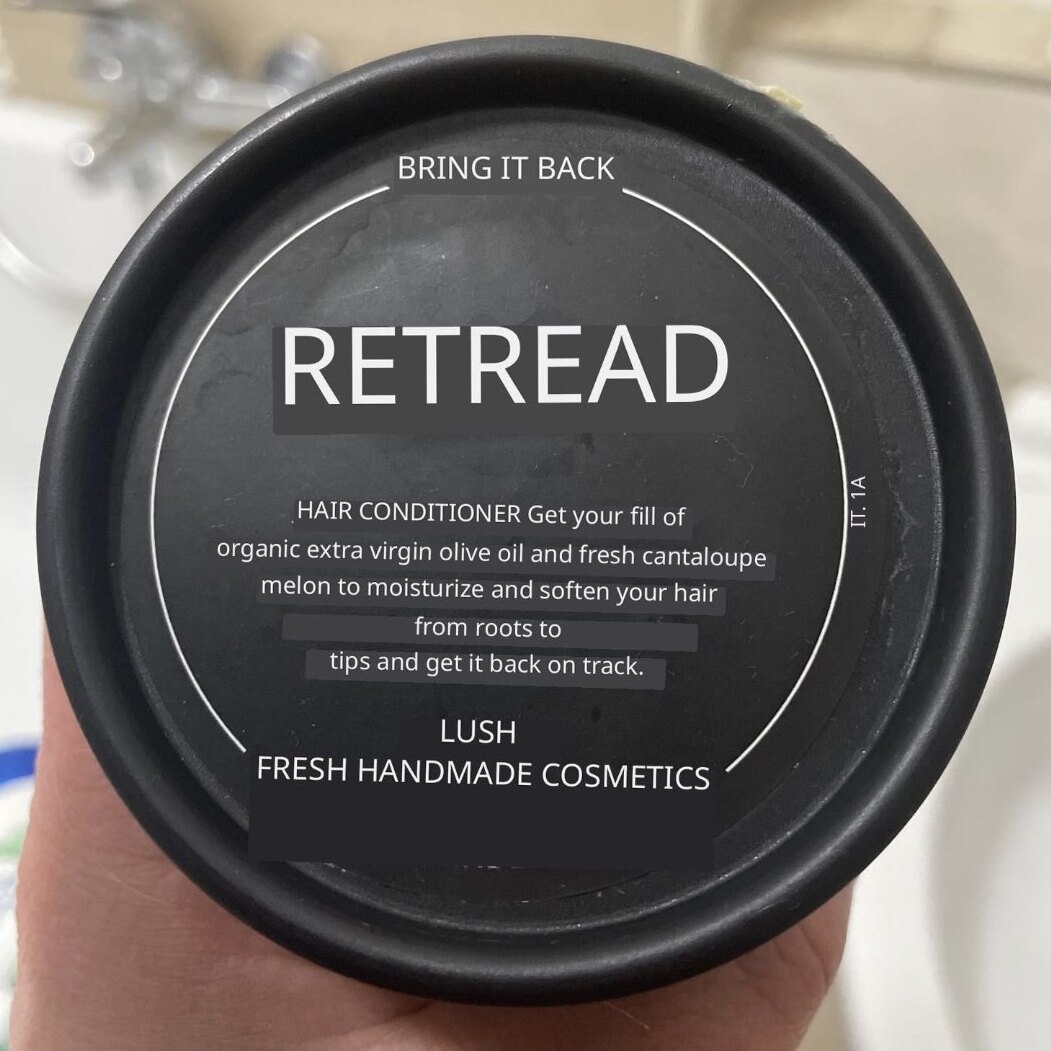 | 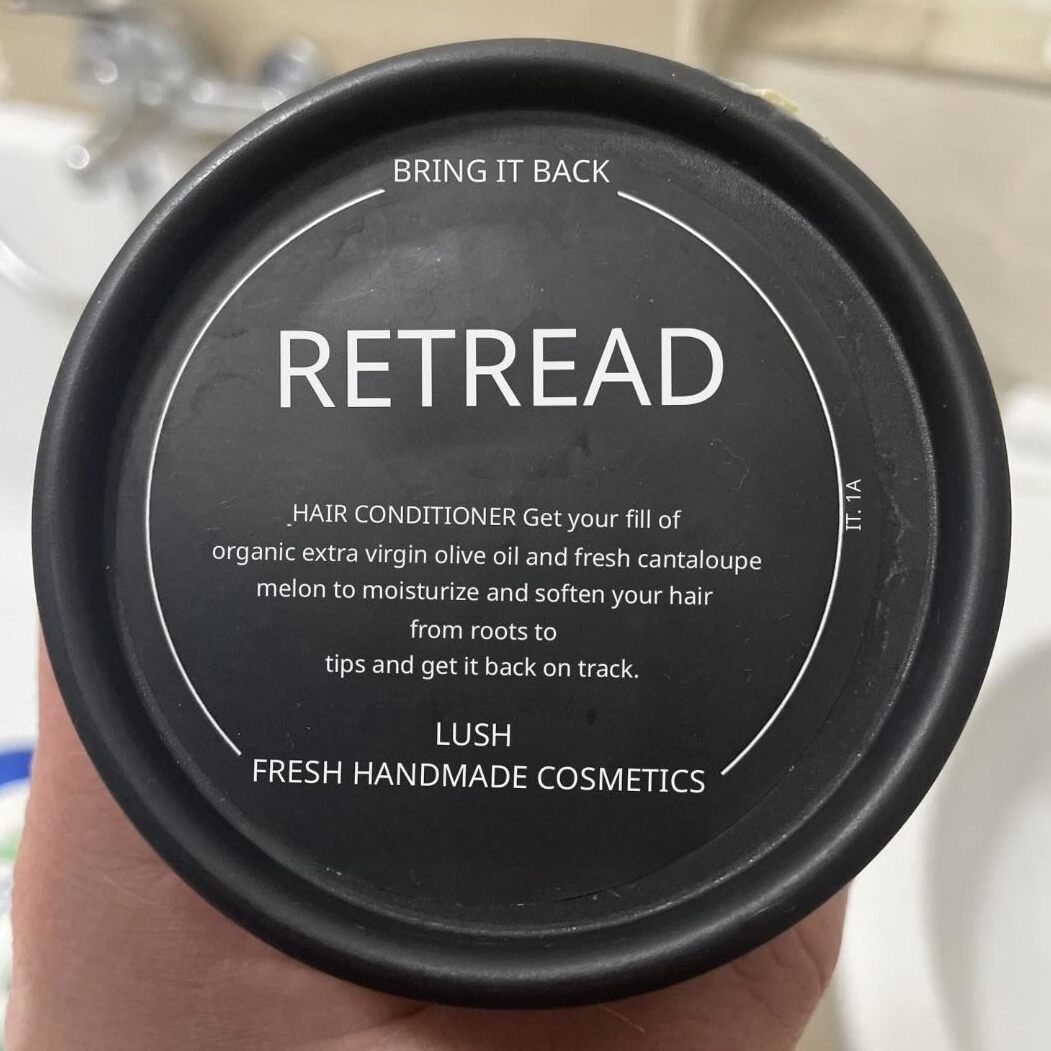 |  |
|---|---|---|---|
| Original | Overlay | Inpainting | Generative |
Lara's Image API is fully integrated into our ecosystem and uses your translation memories and glossaries to ensure consistent technical terminology and tone across all projects.
To get the best results, make sure the text is clearly legible. If no language is specified, Lara automatically detects it, making it easy to handle multilingual inputs through a single streamlined API call.
Image to Image
To begin, you must first instantiate the Translator class. This is the mandatory first step for all operations within the Lara SDK.
Translates image from a source language to a target language. It supports context-aware translations and adaptation to specific translation memories, it returns a translated image.
Request
sample_image_path = "sample_image.png"

translated_image = lara.images.translate(
            source="en-US",
            target="fr-FR",
            image_path=sample_image_path,
            model="generative"
        )
const res = await lara.images.translate('path/to/image.jpg', 'en-US', 'it-IT', {
adaptTo: ['mem_1_id', 'mem_2_id'],
glossaries: ['gls_1_id', 'gls_2_id'],
instructions: ['Be formal'],
style: 'fluid',
model:'generative'
});File imageFile = new File("image.jpg");
ImageTranslateOptions options = new ImageTranslateOptions();
options.setAdaptTo("mem_1234...");
options.setGlossaries("gls_1234...");
options.setTextRemoval(ImageTextRemoval.OVERLAY);
InputStream translated = lara.images.translate(imageFile, "en-US", "it-IT", options);$sampleFilePath = __DIR__ . '/sample_image.png';
$sourceLang = "en";
$targetLang = "de";
$translatedStream = $lara->images->translate($sampleFilePath, $sourceLang, $targetLang, new ImageTranslationOptions([
'model' => 'generative'
]));
$outputPath = __DIR__ . '/sample_image_translated.png';
$outputFile = fopen($outputPath, 'w');
stream_copy_to_stream($translatedStream, $outputFile);
fclose($outputFile);
fclose($translatedStream);// Sdk available soon
// Sdk available soon
val imageFile = File("image.jpg")
val options = ImageTranslateOptions().apply {
    adaptTo = "mem_1234..."
    glossaries = "gls_1234..."
    model = ImageTextRemoval.GENERATIVE
}
val translated: InputStream = lara.images.translate(imageFile, "en-US", "it-IT", options)
var sampleFilePath = Path.Combine(Directory.GetCurrentDirectory(), "textimage.png");
var sourceLang = "en";
var targetLang = "de";
var translatedStream = await lara.Images.Translate(sampleFilePath, sourceLang, targetLang, options);
var outputPath = Path.Combine(Directory.GetCurrentDirectory(), "sample_image_translated.png");
await using (var fileStream = File.Create(outputPath))
{
await translatedStream.CopyToAsync(fileStream);
}
// Create a MultipartFile from the image data
let file = MultipartFile(filename: "sample_image.png", data: imageData)

let translatedImageData = try await lara.images.translate(
          file: file,
          source: sourceLang,
          target: targetLang,
          options: ImageTranslationOptions(model: .generative)
        )

// Save the translated image
let outputPath = "./sample_image_translated.png"
try translatedImageData.write(to: URL(fileURLWithPath: outputPath))
Here follows the basic fields for the translate method:
| Field | Type | Required | Default | Description |
|---|---|---|---|---|
| file / imagePath | File / String | Yes | The input image/the path to input image to translate. | |
| source | String | No | The source language code (e.g., "en-EN" for English). If not specified, the system will attempt to detect it automatically. | |
| target | String | Yes | The target language code (e.g., "it-IT" for Italian). This specifies the language you want the image translated into. | |
| options | ImageTranslationOptions | No | See the table below for details. |
Several options are available to customize the behavior of the translate method:
| Field | Type | Required | Default | Description |
|---|---|---|---|---|
| model | String | No | inpainting | Customize how the original text is removed from the image. Available values: inpainting,overlay,generative |
| adaptTo | String[] | No | Default is all Memories on your account | A list of translation memory IDs for adapting the translation. |
| glossaries | String[] | No | A list of glossary IDs. | |
| noTrace | Boolean | No | False | If true, images and extracted text are retained for 1 hour after the link is sent. Otherwise, they may be retained for up to 7 days under the standard retention policy for reliability and support. |
| style | String | No | faithful | The style to apply to the translation. Available values:faithful,fluid, creative |
Image to text translation
Translates the text inside an image from a source language to a target language. It supports context-aware translations and adaptation to specific translation memories, it returns the original and the translated text.
Request
sample_image_path = "sample_image.png"

text_results = lara.images.translate_text(
            source="en-US",
            target="es-ES",
            image_path=sample_image_path
        )
const res = await lara.images.translateText('path/to/image.jpg', 'en-US', 'it-IT', {
adaptTo: ['mem_1_id', 'mem_2_id'],
glossaries: ['gls_1_id', 'gls_2_id'],
style: 'fluid'
});File imageFile = new File("image.jpg");
ImageTextTranslateOptions options = new ImageTextTranslateOptions();
options.setAdaptTo("mem_1234...");
options.setGlossaries("gls_1234...");
ImageTextResult result = lara.images.translateText(imageFile, "en-US", "it-IT", options);$sampleFilePath = __DIR__ . '/sample_image.png';
$sourceLang = "en";
$targetLang = "de";
$results = $lara->images->translateText($sampleFilePath, $sourceLang, $targetLang, new ImageTextTranslationOptions([
'adaptTo' => ['mem_1A2b3C4d5E6f7G8h9I0jKl'], // Replace with actual memory IDs
'glossaries' => ['gls_1A2b3C4d5E6f7G8h9I0jKl'], // Replace with actual glossary IDs
'style' => 'faithful'
]));
foreach ($results as $index => $result) {
echo "\nText Block " . ($index + 1) . ":\n";
echo "Original: " . $result->getText() . "\n";
echo "Translated: " . $result->getTranslation() . "\n";
}// Sdk available soon
val imageFile = File("image.jpg")
val options = ImageTextTranslateOptions().apply {
    adaptTo = "mem_1234..."
    glossaries = "gls_1234..."
}
val result: ImageTextResult = lara.images.translateText(imageFile, "en-US", "it-IT", options)
var sampleFilePath = Path.Combine(Directory.GetCurrentDirectory(), "textimage.png");
var sourceLang = "en";
var targetLang = "de";
var options = new ImageTextTranslateOptions
{
AdaptTo = new[] { "mem_1A2b3C4d5E6f7G8h9I0jKl" }, // Replace with actual memory IDs
Glossaries = new[] { "gls_1A2b3C4d5E6f7G8h9I0jKl" }, // Replace with actual glossary IDs
Style = TranslationStyle.Faithful
};
var results = await lara.Images.TranslateText(sampleFilePath, sourceLang, targetLang, options);
for (int i = 0; i < results.Paragraphs.Length; i++)
{
var paragraph = results.Paragraphs[i];
Console.WriteLine($"\nText Block {i + 1}:");
Console.WriteLine($"Original: {paragraph.Text}");
Console.WriteLine($"Translated: {paragraph.Translation}");
}// Create another MultipartFile for text extraction
let file3 = MultipartFile(filename: "sample_image.png", data: imageData)
let textOptions = ImageTextTranslationOptions(
adaptTo: ["mem_1A2b3C4d5E6f7G8h9I0jKl"], // Replace with actual memory IDs
glossaries: ["gls_1A2b3C4d5E6f7G8h9I0jKl"], // Replace with actual glossary IDs
style: .faithful
)
let results = try await lara.images.translateText(
file: file3,
source: sourceLang,
target: targetLang,
options: textOptions
)
// Display each text block and its translation
for (index, paragraph) in results.paragraphs.enumerated() {
print("\nText Block \(index + 1):")
print("Original: \(paragraph.text)")
print("Translated: \(paragraph.translation)")
}Here follows the basic fields for the translateText method:
| Field | Type | Required | Default | Description |
|---|---|---|---|---|
| file / imagePath | File / String | Yes | The input image/the path to input image to translate. | |
| source | String | No | The source language code (e.g., "en-EN" for English). If not specified, the system will attempt to detect it automatically. | |
| target | String | Yes | The target language code (e.g., "it-IT" for Italian). This specifies the language you want the text translated into. | |
| options | ImageTextTranslationOptions | No | See the table below for details. |
Several options are available to customize the behavior of the translateText method:
| Field | Type | Required | Default | Description |
|---|---|---|---|---|
| adaptTo | String[] | No | Default is all Memories on your account | A list of translation memory IDs for adapting the translation. |
| glossaries | String[] | No | A list of glossary IDs. | |
| noTrace | Boolean | No | False | If set to True, source content and its translation will not be saved on our system. (AKA Incognito mode) |
| style | String | No | faithful | The style to apply to the translation. Available values:faithful, fluid,creative |
Output
{
  "source_language": "it",
  "adapted_to": [
    "mem_30vccxbs25BqfjoGzYQvgL"
  ],
  "glossaries": null,
  "paragraphs": [
    {
      "text": "BALSAMO PER CAPELLI Fai il pieno d'olio extravergine d'oliva biologico e melone cantalupo fresco per idratare e ammorbidire i capelli dalle radici alle punte e rimetterli in pista.",
      "translation": "HAIR CONDITIONER Indulge in organic extra-virgin olive oil and fresh cantaloupe melon to moisturize and soften your hair from root to tip and get it back on track.",
      "adapted_to_matches": null,
      "glossaries_matches": null
    }
  ]
}
Supported languages
Pricing
Details are available in the pricing page
Updated 3 months ago